
From single-master kubeadm to HA, AD logins and Gateway API: 7 things that broke
Turning an on-prem kubeadm lab into a production-style platform: kube-vip HA, Velero restore drills, Active Directory logins for kubectl via Dex and structured authentication, and HAProxy Gateway API. With the mistakes.`` title: "From single-master kubeadm to HA, AD logins and Gateway API: 7 things that broke" published: false description: "Turning an on-prem kubeadm lab into a production-style platform: kube-vip HA, Velero restore drills, Active Directory logins for kubectl via Dex and structured authentication, and HAProxy Gateway API. With the mistakes." tags: kubernetes, devops, security, tutorial cover_image: 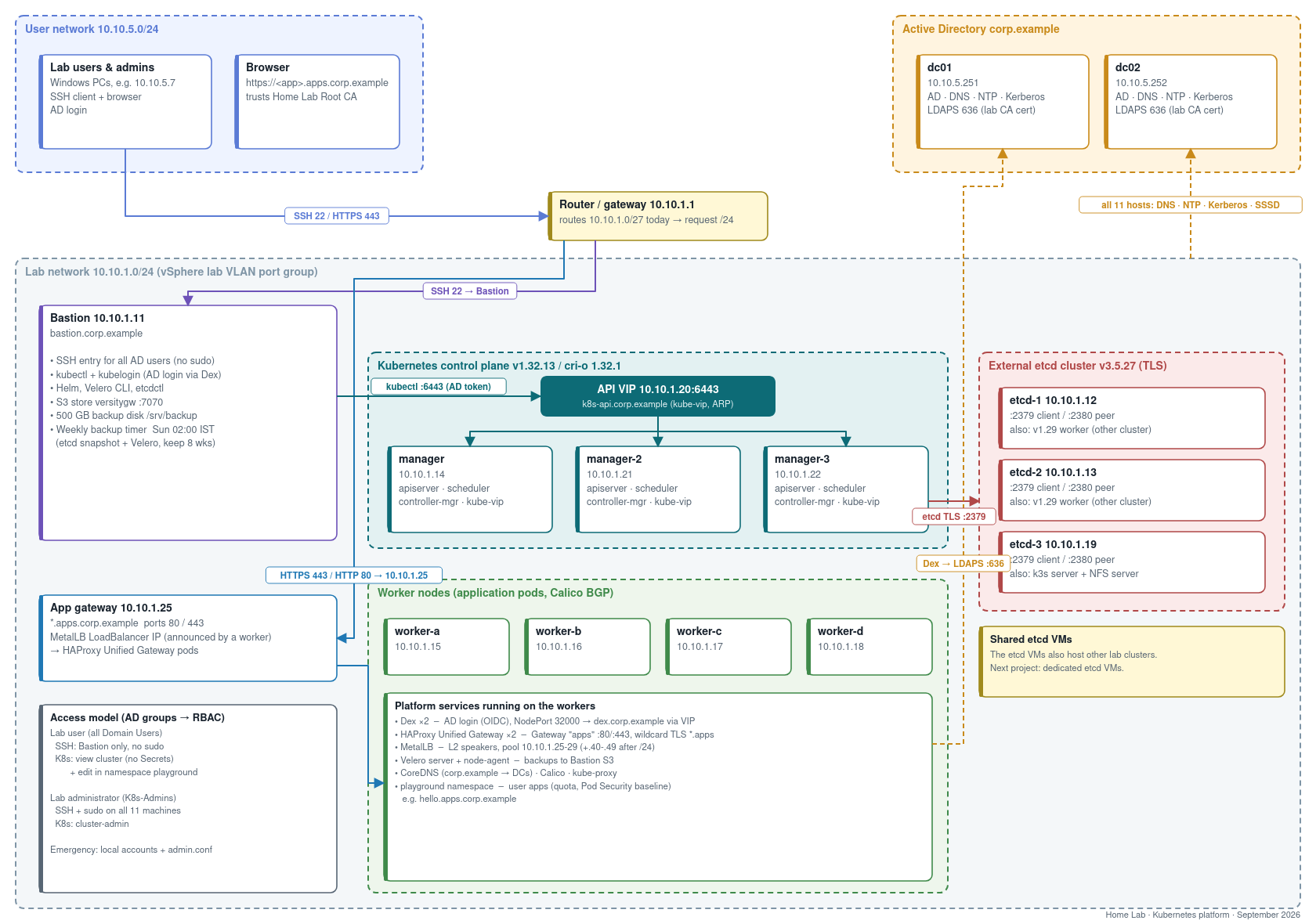 Our lab Kubernetes cluster started the way many do: kubeadm init on one VM, a few workers, and a kubeconfig copied around. It worked, until people started depending on it. The starting point - one control-plane node, so one reboot meant no API; - no backups; - admin.conf shared around, with local Linux accounts on every VM; - clocks drifting by up to 6 minutes, which is enough to break TLS and Kerberos in creative ways. The goal: something a whole team can use safely, on plain VMware VMs, with no cloud load balancer. Everything below is scripted and published (sanitized) here: 👉 https://github.com/Willey2003/k8s-ha-ad-gateway-lab Stack: Kubernetes 1.32 (kubeadm) · cri-o · Calico · external etcd 3.5 · kube-vip · Velero 1.18 · versitygw (S3) · Dex 2.45 · MetalLB 0.16 · HAProxy Unified Gateway · Gateway API 1.3 · Active Directory (SSSD, Kerberos, LDAPS) · chrony 1. High availability: moving a running cluster to a VIP Adding control-plane nodes is easy. The hard part is that a kubeadm cluster built on one node has that node's IP baked in everywhere: - controlPlaneEndpoint in thekubeadm-config ConfigMap; - the API server certificate SANs; - every kubelet's kubeconfig; - the kube-proxy ConfigMap; - the cluster-info ConfigMap inkube-public , which new nodes use to join; - admin.conf /super-admin.conf . I used kube-vip as a static pod in ARP mode: a floating IP that moves between control-plane nodes, with no external load balancer. The migration runs in three scripts, each with a backup and a rollback path: - vip-1-manager.sh :- adds the VIP and its DNS name to certSANs ; - re-issues the API server certificate; - rewrites controlPlaneEndpoint ; - points kube-proxy ,cluster-info and the admin kubeconfigs at the VIP; - restarts kube-proxy. - adds the VIP and its DNS name to - vip-2-kubelet.sh : on every node, switches the kubelet to the VIP and checks that the node staysReady . - vip-3-join.sh : joins the new control-plane nodes against the VIP.
 bash kubectl get cm kube-proxy -n kube-system -o yaml \ | sed "s|https://$OLD:6443|https://$VIP:6443|" | kubectl replace -f - kubectl get cm cluster-info -n kube-public -o yaml \ | sed "s|https://$OLD:6443|https://$VIP:6443|" | kubectl replace -f - kubectl -n kube-system rollout restart ds kube-proxy A failover test script temporarily stops kube-vip on the node holding the VIP, checks that another control-plane node takes over the address and the API keeps answering, then puts kube-vip back as a standby. Result: about 1 second. 2. Backups you can trust, and a drill that proves it - etcd snapshots: weekly, from the bastion. - Velero: with the node agent (kopia), so persistent volume data is backed up too, not just manifests. - Where it goes: a self-hosted S3 endpoint (versitygw) on a dedicated disk, run by a systemd timer every Sunday. The interesting part is the restore drill. It: - creates a namespace with a ConfigMap, a Secret and a pod that has a volume; - writes a random proof string; - backs it all up, deletes the namespace, and restores it; - checks that every piece came back. My first version "passed"… for the wrong reason. More on that in lesson 7. 3. Active Directory for Linux and for kubectl Linux: every node is joined to AD with realmd + SSSD. - SSH access is limited by AD group: simple_allow_groups . - sudo comes from an AD group. - Kerberos gives single sign-on between nodes. Regular users can SSH to the bastion only; admins can reach everything. Kubernetes: kubectl logins with AD accounts need three pieces: - LDAPS on the domain controllers: a small internal CA signs a certificate for each DC. - Dex as the OIDC provider, with an LDAP connector against AD and the password grant, so a CLI user just types their AD password. - The API server's structured authentication config ( AuthenticationConfiguration , beta since 1.30). It replaces the old--oidc-* flags and lets you map claims with CEL: yaml apiVersion: apiserver.config.k8s.io/v1beta1 kind: AuthenticationConfiguration jwt: - issuer: url: https://dex.corp.example:32000 audiences: [kubernetes] certificateAuthority: | -----BEGIN CERTIFICATE----- ... claimMappings: username: expression: "'ad:' + claims.preferred_username" groups: expression: "(has(claims.groups) ? dyn(claims.groups).map(g, 'ad:' + string(g)) : []) + ['ad:all-users']" uid: claim: sub claimValidationRules: - expression: "has(claims.preferred_username) && claims.preferred_username != ''" message: "token has no preferred_username" - expression: "has(claims.preferred_username) && claims.preferred_username != ''" message: "token has no preferred_username" The trick is in the last part of groups . Every authenticated AD user also gets the synthetic group ad:all-users , so RBAC can grant a baseline to all of them without anyone maintaining an AD group: | Who | Kubernetes permissions | |---|---| ad:all-users | view cluster-wide (no Secrets) + edit in a playground namespace with a ResourceQuota and Pod Security baseline | ad:K8s-Admins | cluster-admin | | break-glass | local admin.conf on the control plane | On the bastion, kubelogin is preconfigured on first login. The first kubectl prompts for the AD password once, and tokens refresh for up to 7 days. 4. Ingress for 2026: Gateway API instead of Ingress-NGINX Ingress-NGINX has been retired, so this was a good moment to go straight to Gateway API: - MetalLB in L2 mode hands out LoadBalancer IPs on the VM network. - HAProxy Unified Gateway implements the haproxy GatewayClass. - One shared Gateway with a wildcard certificate serves*.apps.corp.example . yaml apiVersion: gateway.networking.k8s.io/v1 kind: Gateway metadata: {name: apps, namespace: haproxy-unified-gateway} spec: gatewayClassName: haproxy listeners: - name: https protocol: HTTPS port: 443 hostname: "*.apps.corp.example" tls: mode: Terminate certificateRefs: [{kind: Secret, name: apps-wildcard-tls}] allowedRoutes: {namespaces: {from: All}} To publish an app, a user needs only an HTTPRoute . There's no certificate, IP or LoadBalancer to manage: yaml apiVersion: gateway.networking.k8s.io/v1 kind: HTTPRoute metadata: {name: hello} spec: parentRefs: [{name: apps, namespace: haproxy-unified-gateway}] hostnames: [hello.apps.corp.example] rules: - backendRefs: [{name: hello, port: 80}] This split of roles is the real win of Gateway API: platform admins own the Gateway , and app teams own their routes. The part worth reading: 7 things that broke 1. Check the router's subnet, not just your hosts' Every VM had a /24 , so I gave MetalLB a pool high in the range. The gateway IP answered perfectly from inside the subnet… and silently timed out from every other network. The router's interface was configured as a /27 , so it never forwarded traffic for anything above .31 . Moving the Gateway into the routed range fixed it immediately. Test load-balancer IPs from a different network before you announce them. 2. Validate the API-server auth config before a rolling restart My first groups expression was claims.groups.map(g, 'ad:' + g) . CEL type-checking rejects it, because claims.groups is any , and any isn't iterable. It needs dyn(claims.groups) . The API server refuses to start with an invalid config, so this crash-looped two control-plane nodes. The fix for next time: run the same kube-apiserver binary locally with only --authentication-config pointing at the file. It fails in seconds with the exact CEL error, and it doesn't touch the cluster. 3. A health check must prove the new container is healthy After editing a static pod manifest, /readyz may still be answered by the old API server process for a few seconds. So a naive "wait for readyz" passes, and then the new container crash-loops. The fix: record the container ID first, wait for a different container ID, then require several consecutive healthy checks. If that fails, restore the backup manifest automatically. bash cid() { crictl ps --name '^kube-apiserver$' -q | head -1; } ...wait until $(cid) != $OLD_CID AND /readyz is ok 6 times in a row, else roll back 4. HAProxy sizes its memory budget from the container limit With a 1 GiB memory limit, TLS stopped working and the log showed a maxsslconn /memmax alert. HAProxy derives memmax from the cgroup limit and checks it against the default maxconn . Raising the limit to ~2.5 GiB fixed it. When a proxy misbehaves only under TLS, look at memory settings before certificates. 5. Dex expands $VAR in config values The LDAP bind password contained a $ . Dex expanded it as an environment variable, which turned it into a different password, and AD answered with "invalid credentials" for a password that was definitely correct. The fix: set DEX_EXPAND_ENV=false in the Dex deployment. It cost an afternoon. 6. Never make a repair tool depend on the thing it repairs The first password-rotation script for the Dex service account used kubectl … logged in through Dex. So when Dex couldn't bind to AD, the tool that fixes Dex couldn't run. The final version: - authenticates to AD directly over LDAPS; - resets the password, and verifies the new one with a real bind; - writes the Dex secret over SSH, using the control plane's local admin config. No copy-paste, and it works exactly when it's needed: when Dex is broken. 7. Prove the restore, not the backup My fi
Comments
No comments yet. Start the discussion.