Fitbit Edge review: Google strikes the right balance
Want a beautiful tracker with a screen but don't want AI on your wrist? The Fitbit Edge is perfect for you.
In the ten years since I reviewed the original Fitbit Alta, I've noticed a pattern. Try as it might to create an activity tracker that looks attractive, Fitbit has never quite delivered.
When the Fitbit Alta was launched in 2016, the company had been working with Tory Burch on accessories to make the device "super-chic." But with its rigid cuff-like band and generic appearance, the Alta didn't come off fashionable or pretty. It was just another fitness tracker in a smaller frame.
Fitbit later unveiled the Alta HR, which retained a similar appearance, and the more recent Luxe, with a shinier stainless steel case and softer, nicer-looking bands. And yet, despite the company's proud proclamation that the Luxe was one of its "most fashionable and comfortable devices yet," I found its small size more impressive than its style.
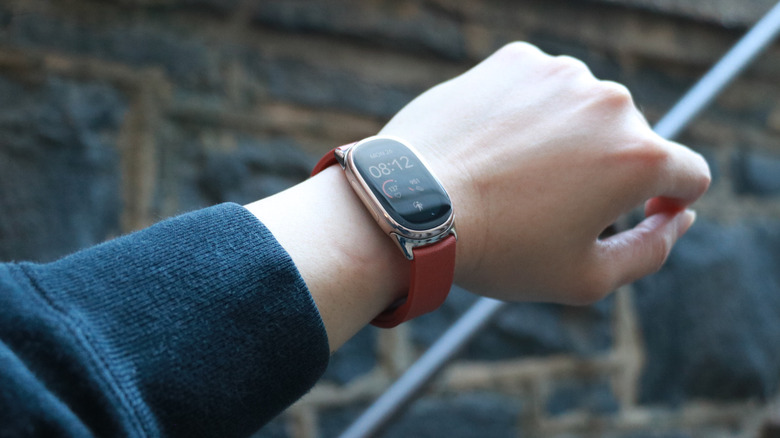
We live in a world of oblongs, and the Fitbit Edge is admittedly just a curvier and wider oblong than the Luxe and the Alta. Yet it packs quite a punch compared to those before it, thanks to a bright, navigable touchscreen, a more attractive array of straps and an updated feature set that makes the Edge feel as modern as it looks.
Design and display
A lot of what I like about the Fitbit Edge, especially compared to the Fitbit Air and Pixel Watch 5 (and other modern smartwatches), lies entirely in its design.
While I loved the simplicity of the Fitbit Air's screenless design, its lack of a display did have drawbacks. I always had to whip out my phone to start logging workouts, and it didn't have a readout of my heart rate for me to see if I should push harder or slow down. I'd have to keep my phone nearby so I could look at it for that data.
Meanwhile, though smartwatches like the Pixel Watch 5 and the Apple Watch have larger screens that enable all that, they tended to get in the way when I was doing pushups or moving planks, for instance. Thanks to its narrower shape, the Fitbit Edge stayed mostly tucked out of the way.
I was pleasantly surprised to find that I could bend my wrist quite a generous angle without ever triggering its side button, and didn't have to turn it so its face was on the inside of my wrist. On wider-faced wearables like Apple, Pixel and Galaxy watches, their buttons would protrude too far and inadvertently get pushed.
Of course, similarly shaped activity trackers have existed for years as well, but what the Fitbit Edge brings is a shiny case, thinner bezels and a screen that elevates its functionality. I complained about the Luxe's display being small and hard to read. The Edge does not have that issue.
Its display was consistently bright and easy to see in various lighting conditions, and it mostly recognized my taps and swipes promptly. Is it the most responsive touchscreen on a wearable? No - I occasionally found myself waiting for something to happen after I swiped to find a tile. But in those cases it was usually that the Edge was still in a sleep state. Most of the time when I was certain it was awake, the screen felt as responsive as the Pixel Watch's.
That's a significant step up from the lackluster and laggy displays on previous Fitbits, which took a lot of prodding to work.
The physical button on the Edge's side is also easy to use, and frankly a relief when compared to the touch-sensitive faux button on the Inspire 3 and the haptic one on the Charge 6.
Speaking of the latter, in many ways the Fitbit Edge feels like its spiritual successor - a Charge 7, shall we say. The Edge has a similarly sized case, just a bit bigger and more rounded. Both share a lot of features, including Google Maps support and the ability to take ECG readings. But the Edge has a nicer, larger screen with adjustable brightness, an altimeter to measure elevation gain or steps climbed, GPS tracking for outdoor runs or walks and an IP68 certification for dust and water-resistance (in addition to the 5 ATM rating they both have). Not to mention, the Edge has a proper button and greater media playback support as well.
The list of differences between the two models is long and complicated so I'll just point out that the Edge doesn't have NFC for contactless payments while the Charge 6 does. And finally, the new device costs about $20 more.
A word on Fitbit Edge straps (and the Fitbit Air's new metal mesh band)
One of the reasons the Edge is so appealing is its appearance, which is further enhanced by the bands you use with it. Google sent along two straps in addition to the silicone one that came in the box, and both of them really made the Edge look better.
I also found it easy to swap out bands - just pushing down the catch on the device's underside and pulling away from the case would remove a strap. Connecting one was as simple as pushing it into the groove.
At first, I struggled to close the Magnet band that snapped together with, well, a magnetic clasp. But once I got the hang of it, I began to appreciate its appearance thanks to its narrow width and stainless steel lugs.
I also loved the Metal Links band that Google sent. The one I received was in gold and it matched my Edge's case so seamlessly that you wouldn't know it was a detachable accessory. My sweet naive gym friend told me they thought it looked like a Rolex. While I think the regulars at r/Rolex would scoff at that assessment, I agree that there is a premium vibe to the Metal Links band.
That said, I have to warn you it costs $150, which is about the same price as a whole Fitbit Charge 6, and just $30 shy of the Fitbit Edge itself.
While we're on the topic, Google also sent me a sample of the new Metal Mesh band for the Fitbit Air, and I am a big fan of how it elevates the tracker's appearance. But I also have to point out that at $70, the Metal Mesh Band is just $30 shy of the Air's retail price. You can find cheaper options elsewhere, but I do think Google's offering looks classier in comparison.
What can the Fitbit Edge do?
At the same time it launched the Fitbit Edge, Google also announced that it was updating the model behind its automatic activity detection. For a device like the Fitbit Air, which as I've already explained is highly dependent on its linked smartphone due to its lack of a screen, passive tracking is extremely important.
After a week with the Fitbit Edge and my months with the Fitbit Air, I can confidently say that the new model is certainly more sensitive and, at least so far, more accurate.
I didn't get the chance to tap at the Fitbit Edge to log a bunch of walks and bike rides in the city over the weekend, and while I would previously worry that my activity wasn't being accounted for, I soon learned to trust the device. A few minutes after I finished cycling or strolling, I'd see a notification from Google Health on my phone that some exercise had been detected "with low confidence." The app prompted me to confirm and name my activity to help improve its assessments, which I gladly did.
In time, the Edge did seem to understand and correctly recognize when I had been on my e-scooter for a quick grocery run.
I still manually started my morning cross training sessions at the gym, because I've been conditioned by the F45 app to do so. (It's horrible at logging your workout metrics if you don't time it to the second.) But the fact that Google was able to improve its system well enough that I learned to relax and trust in the Edge was not only impressive but satisfying.
I'd like to spend more time with this to feel more confident, though, because in my experience AI-powered systems tend to randomly forget things over time, resulting in a lot of long-term frustration.
Outside of the automatic activity tracking, the Fitbit Edge's functions are fairly basic. You can swipe through tiles to look at your progress throughout the day, and depending on how you've set up your selection of cards, you can keep swiping sideways to see things like the weather, sleep score, heart rate, cycle health, media playback and so on. Swiping up from the home screen shows your accumulated notifications, while dragging down from the top brings up a control panel of shortcuts.
I found this section the most helpful, as it contains a toolkit that I've come to consider essential to any smartwatch. You can adjust your screen brightness from here, see battery levels, launch do not disturb or bedtime modes, enable the water lock, broadcast your heart rate to nearby machines or ping your connected phone. You can also activate the flashlight, making the Edge so bright that it can illuminate dark purses or closets in a pinch to help find a missing earring or key, for instance.
Finally, pushing the button on the side opens the app drawer, where you can find functions like ECG readings, a stopwatch, media playback controls and more. There's a very small selection of available apps at the moment, and you'd have to set this up from the Google Health app on your phone to make sure the ones you need are installed on the Edge.
Almost everything here worked as expected. I took an ECG reading, which involved pressing my fingers to either side of the Edge's case. Thirty seconds later, I was told my signs were normal. I played Adéla's "Nicole Kidman" on repeat, and the Edge's media controls helped take me back to the start of the track quickly.
I also had the relatively rare opportunity to compare my data to the readings taken by the equipment in a primary care clinic, as I had to see a doctor during my testing period. According to the oximeter, my pulse rate was 65 beats per minute. Looking back at my data as tracked by the Fitbit Edge, the Google wearable said my heart rate was 75 bpm. Meanwhile, the Apple Watch Series 12 I had on at the same time said my range was between 63 bpm and 77 bpm.
I don't generally expect wearables to be extremely accurate, as I prefer to analyze my readings as trends over time rather than as a snapshot. So I didn't find this one-time comparison to be too concerning.
What I did find a bit odd was the Google Maps integration. After I followed all the instructions on setting this up, which involved going into the Health app and enabling the Maps integration for the Edge, I was disappointed when it didn't seem to work. You're supposed to be able to start a navigation from your phone, and the Edge will show you directions while tracking a running or biking workout in the background. I opened Google Maps on my phone, started navigating to nearby businesses, and the Edge would show that Maps has started. But I kept getting a message saying to make sure the Maps app was running on both devices, and then nothing would happen.
I've reached out to Google to troubleshoot this issue, and will update this review when this gets resolved. For now, though, I'm willing to bet this had a lot to do with fact that I had multiple Fitbit devices connected to multiple iPhones (and a Pixel) on my Google Health app. It's such a niche scenario that I'm not going to consider docking points from the Edge for now, but if I see it happening to more people, we will certainly revisit the score and this review.
Speaking of, during my testing period, I used the Fitbit Edge with both a Pixel 11 Pro and an iPhone 17 Pro Max (yes I'm still stuck on last year's model for now). The experience was largely similar across both pairings, with the main feature difference being that you can't reply to notifications from the Edge when paired with an iPhone. I did encounter some weird connection issues, like the Edge randomly switching to my iPhone 18 Pro instead of the iPhone 17 Pro Max, but again, I'd chalk that up to connectivity issues. And again, it's a pretty uncommon scenario that's mostly exclusive to reviewers like myself.
Google Health app and AI Coach
Thanks to the Fitbit Edge's screen, you actually don't need to spend too much time in Google's Health app if you don't want to. After you've set up your watch faces, tiles and apps, you could probably get by with the on-device summaries of your daily metrics. But since I'd been using the Fitbit Air since I reviewed it in May, I've had to integrate the Health app into my daily routine. And because I'm an unnecessarily competitive person, I obsess over whether I've hit my cardio load targets every week.
At a basic level, the app functions just fine. A customizable panel at the top lets you keep track of your favorite stats, and you can dive deeper into your workout and sleep through the different tabs. But because I'd been using the Premium experience with the AI Health Coach, I've found it just a bit more convenient and, oddly, comforting.
I've been sick for a few days during my testing, so I ended up with a higher resting heart rate than usual. At first, I thought the Fitbit Edge wasn't calibrated correctly or was misreading my data, but on a hunch I asked the AI Health Coach if my illness could be contributing to the poorer cardio performance. I could have Googled that, sure, but it was nice for me to get that assurance from something that actually knew my heart rate over time.
Over the last few months, I've also gone to the coach with questions about random headaches, cycle symptoms and form checks on complicated movements, and I've generally felt mollified by what it said. Plus, my chat history with the system is a good way to remember things that came up in that time frame, which helped me gather my thoughts and concerns when seeing a doctor at a checkup.
Google's AI still is a bit stupid at times. I once asked if it thought I should go out for a walk, since it had just told me to take things easy after realizing I was sick. In response, the coach told me to check the weather, which was odd since it had mentioned in my morning summary that the conditions that day were great f
Comments
No comments yet. Start the discussion.