The BenQ MA270S breaks Apple’s monitor monopoly
Two-Minute Review
The BenQ MA270S looks and acts just like a premium Apple display, but it costs a fraction of the price.
With Microsoft seemingly intent on turning Windows into malware, Macs are increasingly appealing. But while the Apple tax is increasingly diminishing in the consumer laptop space, it’s rife when it comes to compatible monitors. PC-focused alternatives have different colors, pixel densities and features that rarely play well with Macs, meaning users frequently fight losing battles matching what they see on their MacBook screen with a third-party monitor.
But BenQ has taken note. There are several models in BenQ’s new specialist Mac range. Most have 4K resolutions, are 27 or 32 inches in size, have 60Hz refresh rates and offer glossy or matte finishes. There are two outliers: the 120Hz MA320UG and this, the glossy, 5K-resolution MA270S.
Setup is simple, with the clip-on stem affixing to the base with a single thumbscrew. There’s a generous amount of adjustment (including 150mm (5.9in) height and 90° bi-directional pivot) which, unlike Apple, BenQ doesn’t charge extra for. There’s also an unApple-like plethora of ports including two HDMI, two Thunderbolt 4 and four USB 3.2 Gen 2 ports (two USB-C and two USB-A), with up to 96 watts of USB-C power delivery - so one cable can connect and charge a laptop. The USB-A ports also offer 7.5W charging. They also facilitate KVM functionality to connect multiple devices. Apple’s monitors don’t.
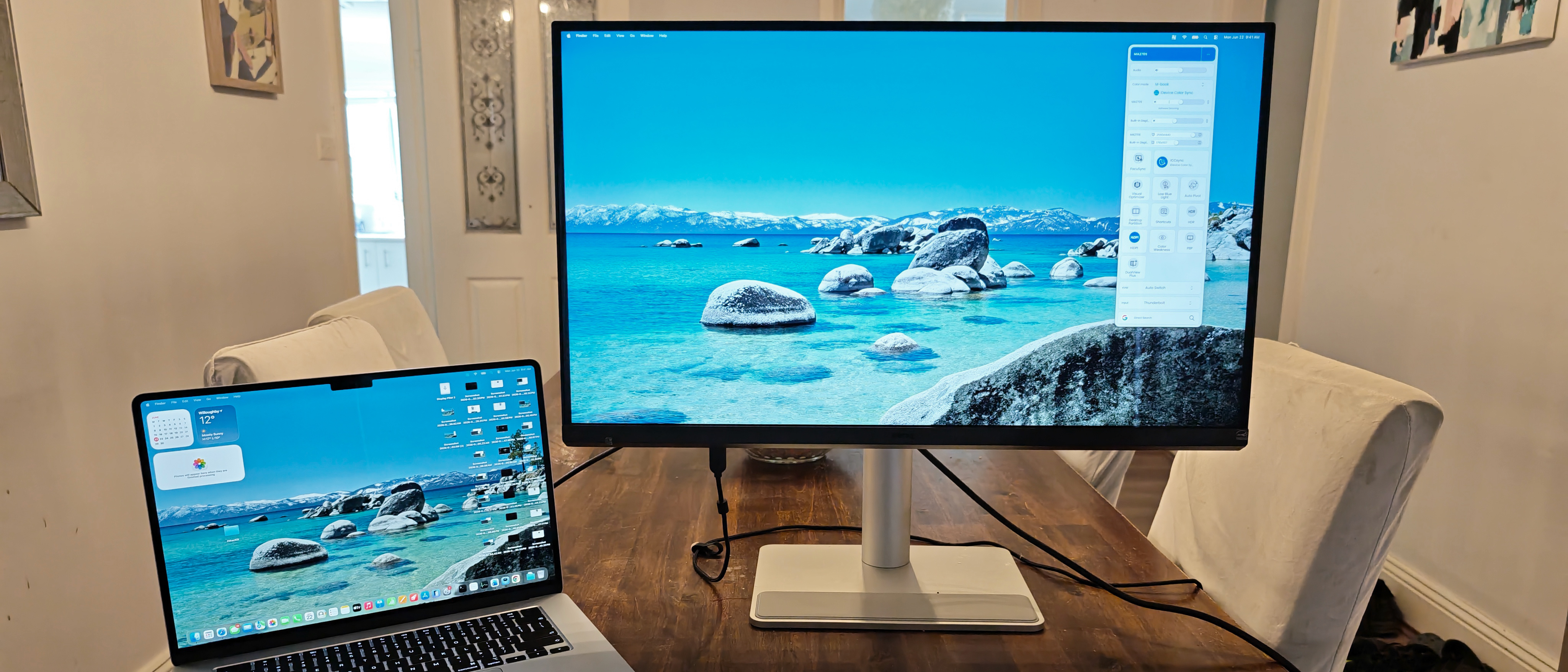
Once connected, BenQ’s factory-calibrated screen instantly resembled the display of the MacBook sitting next to it. Like Apple’s own monitors, the MA270S has a native 5K resolution of 5120 x 2880, giving it a much higher pixel density (218 PPI) than 27-inch, 1440p PC equivalents (~109 PPI). By default, macOS scales the interface to look like 2560 x 1440, which keeps text crisp without making everything tiny.
The IPS screen is very impressive with near-OLED levels of color saturation and LED-backlight-derived (almost completely) true blacks. Multimedia looks good at default settings (vibrant colors, respectable contrast and minimal noise in gradients), but turning on HDR significantly improves everything: more details simultaneously show up in shadows and highlights and all transitions become smooth. The brightest highlights can blow out (with no easy fix), though, and note that the glossy coating can turn into a black mirror when displaying dark content.
A common curse of Retina displays is their sluggish speeds and the MA270S is no different. The slow, 5ms response time marries with a 60Hz refresh rate (it actually goes up to a Spinal Tap-esque 70Hz) to smear fast-moving objects across the screen, so forget about eye-friendly, fast-and-frantic gaming. There’s no integrated webcam, but the two 3-watt speakers (surprisingly for a monitor) have well-rounded fidelity and sound good, despite not getting loud.
Despite having a joystick button, most advanced image settings are controlled by BenQ’s impressive DisplayPilot 2 app. The customizable options can easily swap between color modes and toggle settings like Low Blue Light. Its FocuSync settings match Mac Focus adjustments and enable you to change core monitor settings using Mac settings. You can also auto-sync different color modes with different applications.
Price & Availability
- How much does it cost? $900 / £1,000 / AU$1,699
- When is it available? It’s out now
- Where can you get it? It’s available in the US, UK, Australia and other regions
While it’s not a cheap monitor, the BenQ MA270S is significantly cheaper than Apple’s own Studio displays and, therefore, serves as a much-needed, more affordable, third-party alternative in a monopoly market.
- Value: 4 / 5
Specs
| Specification | Detail |
|---|---|
| Screen size | 27-inch |
| Aspect ratio | 16:9 |
| Resolution | 5120 x 2880 (5K) |
| Brightness | 450 cd/m² typical |
| Refresh rate | 70Hz |
| Response time | 5ms GTG |
| Viewing angle | 178°(H)/178°(V) |
| Contrast ratio | 2,000:1 |
| Color coverage | 99% sRGB, 99% P3 |
| Inputs | 2x HDMI 2.1, 1x Thunderbolt 4 (96W PD), 1x Thunderbolt 4 out (15W PD), 1x USB-C 3.2 Gen 2 (35W PD), 1x USB-C 3.2 Gen 2 (15W PD), 2x USB-A 3.2 Gen 2 (7.5W charging), headphone jack |
| Dimensions | 43.0-58.0 x 61.4 x 22.0cm with stand (16.9-22.8 x 24.2 x 8.7in); 36.8 x 61.4 x 7.6cm without stand (14.5 x 24.2 x 3.0in) |
| Weight | 8.64kg with stand (19.1lb); 5.7kg without stand (12.6lb) |
Design
Apple users have always been an aesthetically appreciative bunch, and so they’ll warm to the color scheme of the BenQ MA270S, which apes that of a standard silver MacBook. The stand is simple to assemble and offers a generous amount of movement in every direction. It's remarkable that Apple charges more for a feature like this - it’s standard on many PC displays.
The multiple ports (which offer different degrees of charging power) mean multiple devices can be simultaneously connected. Furthermore, a single keyboard and mouse can be shared across them using KVM functionality - unholy magic in the eyes of some Apple users.
The joystick button at the base of the screen only provides access to brightness, volume and input selections. To access more comprehensive settings, you’ll need the BenQ DisplayPilot 2 app and the OSD handily provides a QR code to locate it on BenQ’s own website (it’s not in the App Store). It provides access to basic brightness settings, eye comfort and HDR, but also FocuSync settings on your Mac.
Another feature is the rubberized pad on the base of the stand. It provides slightly superior softness and friction compared to the plastic stand, so you may be more tempted to rest your phone on it.
The only element that some users might miss is a built-in webcam. Apple’s own monitors have them, but purchasers of the BenQ MA270S will have to buy a separate unit or use the one in their MacBook.
- Design: 4 / 5
Performance
The best thing you can say about the BenQ MA270S is that it just works. Just connecting it to your MacBook provides you with a matching image of your MacBook’s screen without having to fiddle with countless settings. The screen displays very sharp text, colors are very bright and vibrant, and contrast is generally impressive. However, bright areas and highlights can blow out rather easily when HDR is engaged.
The big drawback is that the 70Hz refresh rate is nowhere near enough to stop the sluggish 5ms pixel response time from smearing most moving objects across the screen. As such, it’s not good for gaming.
Unusually for a monitor, the two 3-watt speakers offer well-rounded fidelity with a modicum of bass. They don’t get particularly loud, though.
- Performance: 4 / 5
Should you buy the BenQ MA270S?
| Category | Verdict | Score |
|---|---|---|
| Value | In terms of monitors, it’s not cheap. In terms of Apple monitors, it represents extraordinary value. | 4 / 5 |
| Design | The MA270S looks and feels like it belongs in Apple’s world - and that’s hard to achieve for third parties. | 4 / 5 |
| Performance | The colors, brightness, sharpness and contrast are everything we’d expect from an Apple monitor. Unfortunately, the sluggish speed is too. | 4 / 5 |
| Final score | At last, MacBook users can afford a compatible external monitor without breaking the bank. | 4 / 5 |
Buy the BenQ MA270S if...
Apple’s homegrown alternatives are unaffordable - While the Apple tax isn’t what it once was, it still exists in monitor land. BenQ has provided some much-needed third-party competition.
You want multiple ports - Apple loves the simplicity of USB-C ports, but the real world often requires more, and BenQ provides them.
Don't buy it if...
You need a built-in webcam - It’s the one glaring omission. It’s worth highlighting its absence, as some long-time Apple buyers would simply expect it to be there.
You want it to play games - The 5ms pixel response time and 70Hz refresh rate make it one of the slowest monitors on the market.
Also Consider
- Philips 27E3U7903 - This expensive, third-party alternative can even beat Apple at its own game.
- BenQ GW2486TC - BenQ’s smaller, older alternative can save you even more money.
Want more options? Check out our guide to the best monitors for MacBook Pro.
Nick Ross is a multi-award-winning, veteran technology journalist. He started out with the UK’s PC Pro magazine before moving to its Australian counterpart, PC Authority. Nick then left to launch The Overclocker before moving on to become the ABC’s first Technology and Games Editor. After that he spent time editing PC World before switching to marketing, commercial and publishing roles. He’s now back as a full-time journalist, writing for his own mastheads, SMBtech.au and High Performance Laptops, while contributing to multiple other titles including TweakTown, iTWire, APC magazine and TechRadar.
Comments
No comments yet. Start the discussion.