Upgrade Amazon EKS clusters with confidence using Kubernetes version rollbacks
Learn how Kubernetes version rollbacks for Amazon EKS let you reverse cluster upgrades within seven days
This new feature provides a safety net for upgrade failures-no cluster rebuilds required-turning Kubernetes version upgrades into a reversible, low-risk operation.
Upgrading a Kubernetes control plane has long been a one way door. Open source Kubernetes doesn’t support control plane rollback, so once you upgrade, there’s no going back. The community is making real progress here, and KEP-4330 introduces emulated versions to ease rollback. But in practice this constraint has pushed organizations to build elaborate compensating mechanisms like bake periods, stagger groups, automated sign offs, and months long upgrade cycles.
With Kubernetes releasing three minor versions per year, teams managing hundreds of clusters, especially in regulated environments, often delay upgrades entirely because they aren’t confident they can recover if something goes wrong. The result is clusters stuck on older versions, missing security patches, and eventually running up against extended support timelines.
Today, we’re announcing Kubernetes version rollbacks for Amazon Elastic Kubernetes Service (Amazon EKS), a new feature that gives cluster administrators a safety net when performing cluster upgrades. With version rollbacks, you can reverse a Kubernetes version upgrade within seven days if you encounter issues after upgrading, returning your cluster to its previous working state.
Where approaches like emulated versions keep a cluster in a transitional holding state, EKS version rollback returns your cluster to a fully validated previous version that ran in production, not an emulation of it. Now, if you upgrade a cluster from, say, Kubernetes 1.34 to 1.35 and discover a compatibility issue, you can roll back to 1.34 within seven days. There’s no need to rebuild your cluster or scramble to troubleshoot under pressure. Think of it as an undo button for Kubernetes version upgrades.
The feature supports rolling back one minor version at a time, matching the same incremental approach EKS uses for upgrades. And to help you roll back safely, EKS automatically evaluates your cluster’s rollback readiness through cluster insights, flagging items like node version compatibility or add-on dependencies before you proceed. If you’ve already assessed the situation and want to move quickly, you can use the --force flag to bypass those checks.
The above applies to all EKS clusters, whether you manage your own nodes or let AWS handle them. But for customers who have embraced fully managed infrastructure, rollback goes a step further.
Rollback for EKS Auto Mode
EKS Auto Mode gives you one click deployment of production ready Kubernetes clusters, automating compute, networking, and storage management so you can focus on your applications rather than infrastructure. EKS Auto Mode introduces additional considerations for version rollbacks because both the control plane and managed nodes need to be rolled back together.
Since node rollbacks respect your pod disruption budgets, the process can take time depending on your configuration. To give you control over this process, we’ve introduced a cancel API that lets you stop a node rollback at any point. If you decide the rollback is taking too long or you want to change your approach, you can cancel and adjust your disruption budgets to accelerate things, or choose a different path forward.
By default, EKS never bypasses your disruption budgets during a rollback because we prioritize workload stability. You can always choose to modify or remove disruption budgets yourself to speed up the process if needed.
Let’s try it out
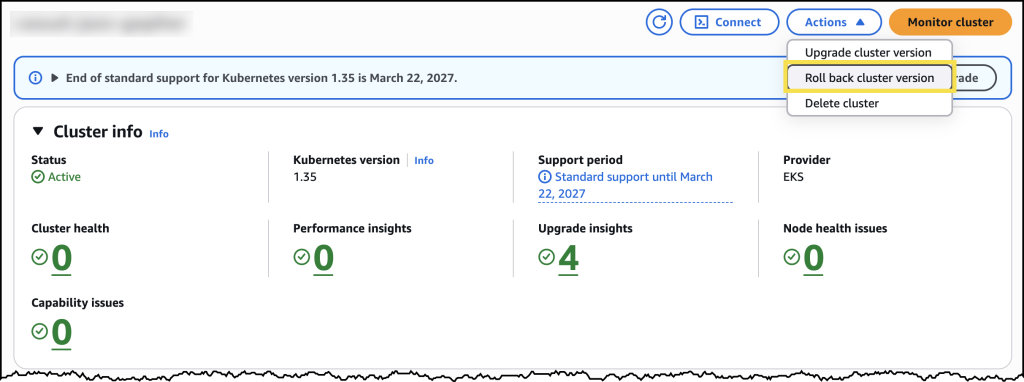
To try version rollbacks, I navigated to the Amazon EKS console and selected one of my clusters that I had recently upgraded. From the cluster’s configuration page, I can see the option to initiate a version rollback, along with information about my current rollback window.
Before initiating the rollback, I reviewed the rollback insights to check for any potential issues. The insights showed me the status of my nodes and flagged anything I should address before proceeding.
After confirming, the rollback began. My cluster remained functional throughout the process. The control plane rollback took about 20 minutes, similar to a standard upgrade. For my EKS Auto Mode cluster, the nodes rolled back gracefully according to my disruption budget settings. Once complete, my cluster was back on the previous Kubernetes version, running as expected.
Now available
Kubernetes version rollbacks for Amazon EKS are available today at no additional cost in all commercial AWS Regions where Amazon EKS is available. You pay only for the standard EKS and compute costs you would normally incur. There are no extra charges for using the rollback capability.
Control plane rollbacks are available for all EKS clusters, and node rollbacks are available for clusters running EKS Auto Mode. Version rollbacks support clusters running Kubernetes versions available in EKS standard support and extended support.
To get started, visit the Amazon EKS documentation or try it out directly in the Amazon EKS console.
Comments
No comments yet. Start the discussion.