
5 Docker Security Mistakes I Learned the Hard Way
Docker makes deploying applications easy. It doesn't automatically make them secure. When I deployed my first Docker application, security wasn't my top concern. The container is isolated. HTTPS is enabled. SSH access is restricted. Everything seemed fine. That was how I approached one of my side projects-a small web application running on a single VPS with Docker and Nginx. No sensitive data. No large user base. Nothing that looked like a worthwhile target. Then I checked the access logs. Within minutes of exposing the server to the internet, I started seeing requests like these:
text GET /.env
GET /.git/config
GET /wp-login.php
GET /vendor/phpunit/phpunit/src/Util/PHP/eval-stdin.php
GET /phpmyadmin/
The application wasn't built with PHP. It wasn't running WordPress. There wasn't even a .env file inside the web root. The bots didn't care. They weren't attacking my application. They were attacking every application they could find. After running Docker workloads for several years, I've noticed the same security mistakes appearing again and again. Here are the five I've made (and seen others make) most often.
Mistake #1: Assuming Nobody Will Find Your Server
One of the biggest misconceptions in self-hosting is that small projects are invisible. They're not. Public IPv4 space is constantly scanned by automated systems looking for exposed admin panels, leaked Git repositories, vulnerable CMS installations, default credentials, and known CVEs. Attackers don't need to know who you are. Automation does the discovery for them. The moment a service becomes publicly accessible, it becomes part of the internet's background noise. That doesn't necessarily mean you're under a targeted attack-it simply means you're participating in an ecosystem where scanning never stops. What to do about it: Assume every service you expose will be discovered within minutes. Don't rely on obscurity. Close ports you don't need, and put anything that isn't meant to be public behind a VPN.
Mistake #2: Treating HTTPS as Security
HTTPS is essential. But encryption and application security solve completely different problems. A typical Docker deployment often looks like this:
Internet
    │
    ▼
Nginx (TLS termination)
    │
    ▼
Docker Container (your app)
TLS protects traffic while it's traveling across the network. It doesn't stop malicious requests from reaching your application. SQL injection attempts. Directory traversal. Credential stuffing. Bot traffic. All of those still arrive at your reverse proxy unless something filters them first. Many developers unconsciously equate "HTTPS enabled" with "application secured." They're not the same thing. What to do about it: Use HTTPS, yes-but also validate inputs, sanitize outputs, and consider what happens when a malicious request reaches your application. HTTPS is the floor, not the ceiling.
Mistake #3: Ignoring Layer 7 Security
Most developers spend plenty of time thinking about infrastructure security: firewall rules, SSH hardening, private networks, Docker isolation. Those are all important. But many real-world attacks happen much higher in the stack-HTTP requests, cookies, headers, authentication flows, application endpoints. That's where a Web Application Firewall (WAF) comes in. Not because you expect sophisticated attackers, but because you want to reduce unnecessary traffic reaching your applications.
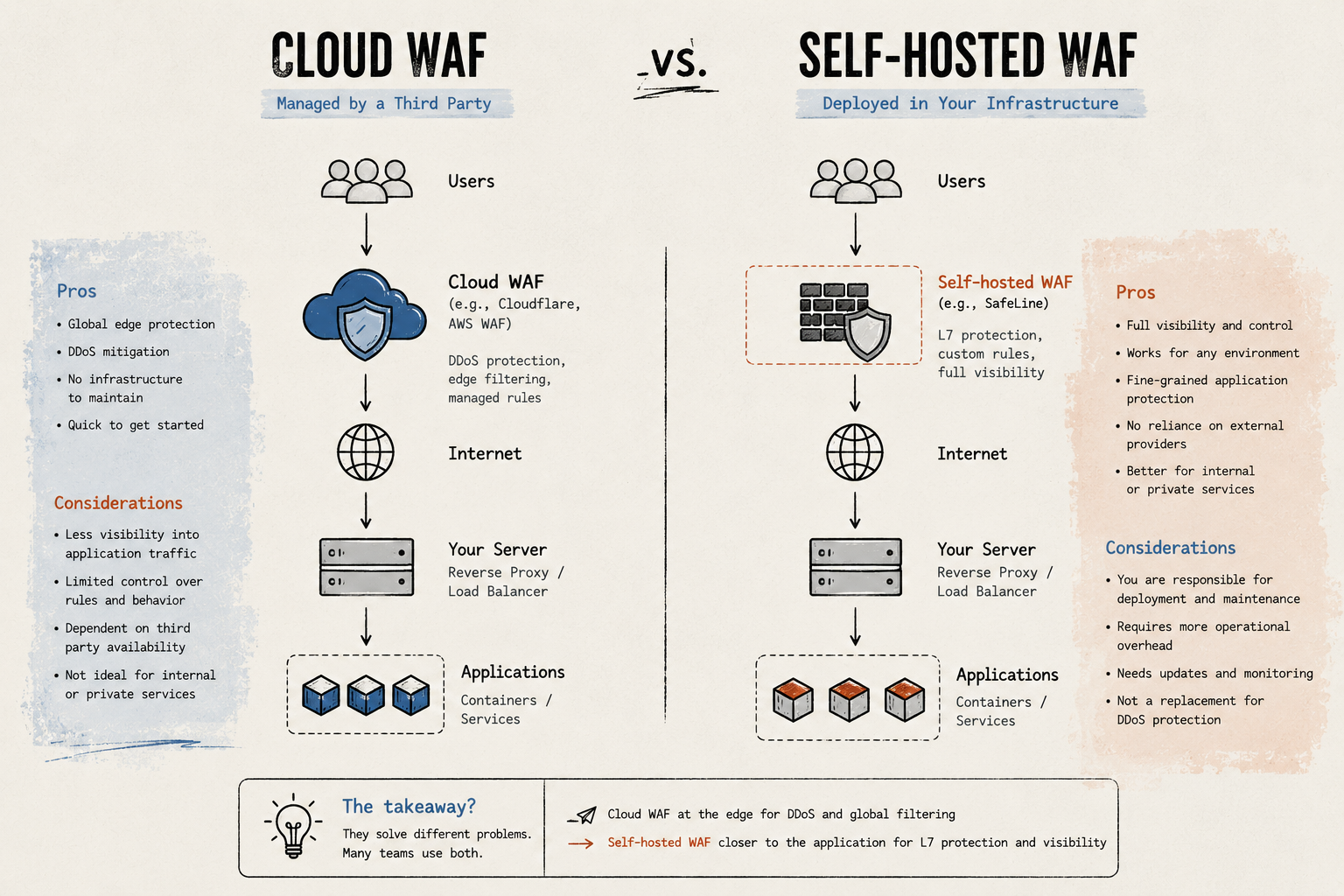
There are two approaches:
Cloud WAF - Services like Cloudflare, AWS WAF, or Google Cloud Armor sit in front of your infrastructure. They're excellent for DDoS mitigation, CDN caching, and blocking known attack patterns-all without adding anything to your server. The downside is that internal traffic between your services typically doesn't pass through them, and you're trusting a third party with your traffic data.
Self-Hosted WAF - A self-hosted WAF runs inside your own infrastructure. Options include open-source tools like ModSecurity (with the OWASP Core Rule Set), Coraza, or dedicated solutions like SafeLine. The advantage is that you control it end-to-end, and it can protect internal services that never touch the public CDN. The trade-off is operational responsibility-updates, configuration, monitoring, and backups are on you. Which one is right depends on your architecture. I've used both in different projects.
What to do about it: At minimum, look at your access logs. If you're seeing automated scanning traffic hitting your application, a WAF-cloud or self-hosted-can filter that noise before it consumes your app's resources.
Mistake #4: Not Understanding Your Traffic
Before I started paying attention to my access logs, I had no idea what was actually hitting my server. Once I started looking, patterns emerged quickly:
- Repeated requests for WordPress endpoints on a non-WordPress server
- Scanning for exposed .git directories and .env files
- SQL injection payloads in query parameters
- Brute-force login attempts against non-existent admin panels
- Automated vulnerability scanners cycling through CVEs
None of these were surprising individually. Together, they painted a much clearer picture of what every public service experiences every day. What to do about it: Set up structured logging. Use a simple dashboard (Grafana + Loki, or even just goaccess on your Nginx logs). The goal isn't building a SOC-it's knowing what's happening on your infrastructure.
Mistake #5: Running Containers as Root
This one is well-known but still everywhere. By default, Docker containers run as root. If an attacker escapes the container or exploits a vulnerability in your application, they might get root access on the host. The fix is simple but often overlooked:
# Create a non-root user
RUN addgroup --system appgroup && adduser --system --group appuser
# Switch to it before running the application
USER appuser
Combine this with --read-only filesystems, dropping unnecessary Linux capabilities, and avoiding --privileged mode. What to do about it: Add a non-root user to every Dockerfile you write. It takes two lines and significantly reduces your attack surface.
A Simple, Practical Deployment
Here's what a reasonably secured single-VPS Docker setup looks like for me today:
Ubuntu Server
├── UFW (allow only 80/443/22)
├── fail2ban (SSH brute-force protection)
├── Docker Engine (rootless where possible)
├── Reverse Proxy (Nginx with ModSecurity or a dedicated WAF)
├── Application Containers (running as non-root)
└── PostgreSQL (bound to localhost only)
No dedicated security team. No enterprise SOC. No expensive monitoring platform. The goal isn't enterprise-grade complexity. It's reasonable protection with reasonable operational overhead.
When You Probably Don't Need a WAF
A WAF isn't always the right answer. I wouldn't add one if:
- Everything already sits behind Cloudflare or an equivalent platform
- The infrastructure is entirely serverless (Lambda, Cloud Run)
- All applications are only accessible through a private VPN or Tailscale
- You're running a local development environment
Every tool you add is something you need to maintain. Be honest about what you're willing to operate.
Final Thoughts
I don't think every Docker deployment needs a Web Application Firewall. A local dev environment probably doesn't. A private service behind WireGuard probably doesn't either. But once an application becomes publicly reachable, the internet starts probing it. That's not paranoia-it's observable reality. The biggest lesson I learned wasn't that my applications were constantly under sophisticated attack. It was that automated scanning is universal and doesn't care about the size of your project. Adding a WAF-whether Cloudflare's free tier or a self-hosted solution-doesn't eliminate that reality. It gives you better visibility, more control, and one additional layer between automated scanners and your applications. If you're an independent developer, a small startup, or a DevOps engineer managing your own infrastructure, start by looking at your logs. Understanding your traffic is often the first step toward improving your security posture.
Key Takeaways
- Every public server is continuously scanned, regardless of its size.
- HTTPS encrypts traffic but doesn't stop application-layer attacks-it's necessary but not sufficient.
- A WAF filters malicious requests before they hit your application, reducing noise and risk.
- Running containers as non-root is easy and effective-do it in every Dockerfile.
- Know your traffic: structured logging and basic monitoring go a long way.
- Choose tools based on your needs, not marketing-every addition carries operational cost.
Docker makes deploying applications easy. It doesn't automatically make them secure. When I deployed my first Docker application, security wasn't my top concern. The container is isolated. HTTPS is enabled. SSH access is restricted. Everything seemed fine. That was how I approached one of my side projects-a small web application running on a single VPS with Docker and Nginx. No sensitive data. No large user base. Nothing that looked like a worthwhile target. Then I checked the access logs. Within minutes of exposing the server to the internet, I started seeing requests like these:
text GET /.env
GET /.git/config
GET /wp-login.php
GET /vendor/phpunit/phpunit/src/Util/PHP/eval-stdin.php
GET /phpmyadmin/
The application wasn't built with PHP. It wasn't running WordPress. There wasn't even a .env file inside the web root. The bots didn't care. They weren't attacking my application. They were attacking every application they could find. After running Docker workloads for several years, I've noticed the same security mistakes appearing again and again. Here are the five I've made (and seen others make) most often.
Mistake #1: Assuming Nobody Will Find Your Server
One of the biggest misconceptions in self
Comments
No comments yet. Start the discussion.