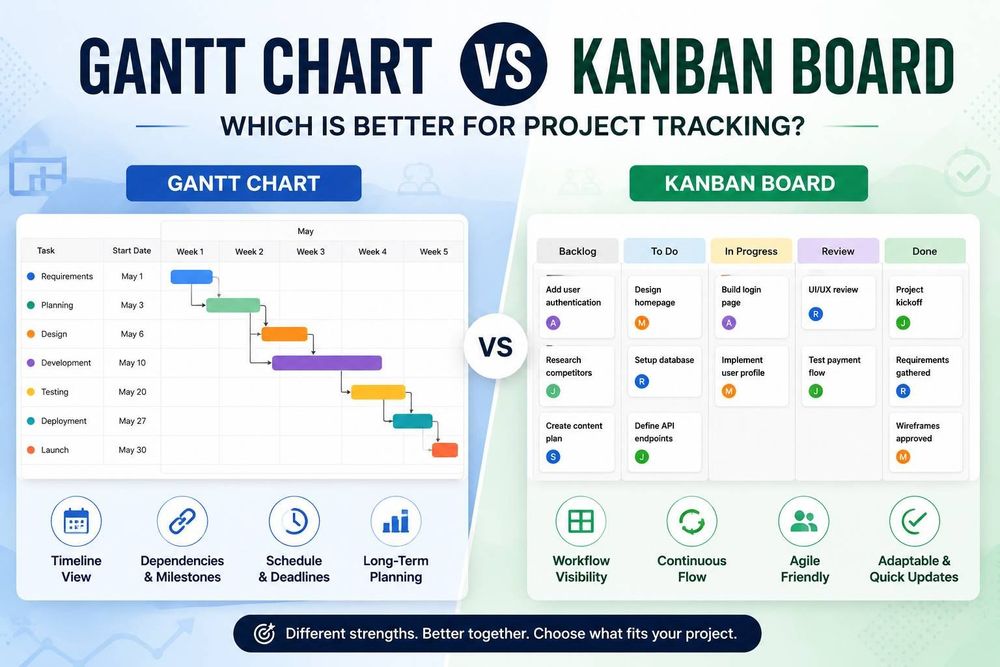
Gantt Chart vs Kanban Board: Which Is Better for Project Tracking?
Gantt Chart vs Kanban Board: Which Is Better for Project Tracking?
Project tracking is one of the biggest challenges teams face today. Whether you're managing a software release, planning a product launch, or coordinating a marketing campaign, success depends on having clear visibility into tasks, timelines, and progress.
Two of the most popular project management visualizations are Gantt charts and Kanban boards. Both help teams organize work and improve collaboration, but they approach project tracking in very different ways. A Gantt chart focuses on timelines, schedules, and dependencies. A Kanban board focuses on workflow and task movement.
Understanding the strengths and limitations of each can help you choose the right approach for your team. In this article, we'll compare Gantt charts and Kanban boards, explore their ideal use cases, and help you decide which visualization is best for your projects.
TL;DR
- Gantt charts are best for projects that require timelines, task dependencies, milestones, and deadline tracking.
- Kanban boards are ideal for managing workflows, visualizing task progress, and supporting Agile teams.
- Use a Gantt chart when planning complex projects with fixed schedules and multiple stakeholders.
- Use a Kanban board when work arrives continuously and priorities frequently change.
- Gantt charts answer "When will work be completed?", while Kanban boards answer "What is everyone working on right now?"
- Many organizations use both tools together-Gantt charts for project planning and Kanban boards for day-to-day execution.
- The best choice depends on your project's complexity, workflow, and visibility requirements.
What Is a Gantt Chart?
A Gantt chart is a timeline-based project management tool that displays tasks along a horizontal timeline. Each task is represented as a bar whose length reflects its duration. Gantt charts help teams visualize:
- Project schedules
- Task durations
- Milestones
- Dependencies
- Deadlines
- Overall project progress
Because tasks are displayed against a timeline, project managers can quickly understand when work starts, when it ends, and how different activities relate to one another.
For example, imagine a website redesign project. The design phase must be completed before development begins, and development must finish before testing starts. A Gantt chart clearly shows these dependencies and helps ensure the project stays on schedule.
Gantt charts are commonly used in:
- Software development projects
- Construction projects
- Product launches
- Manufacturing projects
- Enterprise implementations
They are especially useful when projects involve multiple teams, fixed deadlines, and complex task relationships.
A Website Redesign Gantt Chart
What Is a Kanban Board?
A Kanban board is a visual workflow management tool that organizes tasks into columns representing different stages of work. A typical Kanban board may include columns such as:
- Backlog
- To Do
- In Progress
- Review
- Done
Tasks move from one column to another as work progresses. Unlike Gantt charts, Kanban boards focus less on scheduling and more on workflow visibility. Team members can immediately see what is being worked on, what is waiting for review, and what has already been completed.
For example, a software development team might move user stories from "To Do" to "In Progress," then to "Testing," and finally to "Done."
Kanban boards are widely used by:
- Agile development teams
- DevOps teams
- Customer support departments
- Marketing teams
- Content production teams
They work particularly well in environments where work arrives continuously and priorities frequently change.
Gantt Charts vs Kanban Boards: Key Differences
The easiest way to understand the difference is to compare their primary functions.
| Feature | Gantt Chart | Kanban Board |
|---|---|---|
| Timeline View | Yes | No |
| Task Dependencies | Strong | Limited |
| Project Scheduling | Excellent | Basic |
| Workflow Visibility | Moderate | Excellent |
| Resource Planning | Strong | Limited |
| Agile Team Support | Moderate | Excellent |
| Long-Term Planning | Excellent | Moderate |
| Ease of Use | Moderate | Easy |
While both tools help teams track work, they answer different questions.
A Gantt chart answers:
- When will work be completed?
- What tasks depend on other tasks?
- Are we on schedule?
A Kanban board answers:
- What is everyone working on?
- Where are bottlenecks occurring?
- How is work flowing through the process?
The best choice depends on what information is most important to your team.
When Should You Use a Gantt Chart?
Gantt charts are ideal for projects that require detailed planning and scheduling. They are particularly useful when:
- Projects have fixed deadlines
- Tasks depend on one another
- Multiple teams are involved
- Milestones must be tracked
- Resource allocation is important
Consider a product launch project. Marketing cannot begin promoting a feature until development and testing are complete. These dependencies make timeline visibility critical.
Common use cases include:
- Software implementation projects
- ERP deployments
- Product launches
- Website redesign projects
- Infrastructure upgrades
Modern web applications often use interactive Gantt charts to visualize project timelines and dependencies. If you're building project management software, this guide on creating a JavaScript Gantt chart for project management dashboards provides a practical overview of how Gantt charts can be integrated into modern applications.
When Should You Use a Kanban Board?
Kanban boards work best when the focus is on managing workflow rather than scheduling. They are especially useful when:
- Work arrives continuously
- Priorities change frequently
- Teams follow Agile methodologies
- Tasks are relatively independent
- Workflow visibility is critical
For example, a customer support team may receive new tickets every day. Instead of planning work months in advance, they need to track tickets as they move through different stages of resolution.
Common Kanban use cases include:
- Agile software development
- Customer support operations
- Content marketing workflows
- DevOps processes
- Maintenance projects
Kanban's simplicity makes it easy for teams to adopt and maintain without extensive project planning overhead.
Can You Use Gantt Charts and Kanban Boards Together?
Many organizations use both tools rather than choosing one exclusively. In fact, combining Gantt charts and Kanban boards often provides the best of both worlds.
A common approach is:
- Use a Gantt chart for project planning and scheduling.
- Use a Kanban board for day-to-day task execution.
Project managers can use the Gantt chart to establish deadlines, milestones, and dependencies. Team members can then use the Kanban board to manage their daily work.
This hybrid approach offers several benefits:
- Better long-term planning
- Improved workflow visibility
- Easier progress tracking
- Enhanced team collaboration
Many modern project management platforms now support both visualization methods because they complement each other rather than compete.
Choosing the Right Visualization for Your Project
There is no universal winner in the Gantt chart versus Kanban debate. The right choice depends on your project requirements.
Choose a Gantt Chart If:
- Your project has strict deadlines.
- You need timeline visibility.
- Task dependencies are important.
- You manage large or complex projects.
- Resource planning is required.
Choose a Kanban Board If:
- You follow Agile practices.
- Work arrives continuously.
- Priorities change frequently.
- Workflow transparency is your primary goal.
- Tasks are mostly independent.
Choose Both If:
- You need strategic planning and operational visibility.
- Multiple departments collaborate on projects.
- You want both scheduling and workflow tracking capabilities.
The most effective teams often use each tool for what it does best.
Tools That Support Gantt Chart Project Tracking
If your projects require timeline visualization, it's important to choose a solution that supports:
- Interactive timelines
- Task dependencies
- Milestone tracking
- Resource management
- Dashboard integration
- Customization options
Today, there are many options available for developers and businesses looking to implement Gantt chart functionality. If you're evaluating solutions, this comparison of the best Gantt chart libraries provides a useful starting point for understanding the available choices.
When selecting a tool, focus on your project's complexity, scalability requirements, and integration needs rather than simply choosing the most feature-rich option.
Learn more about creating a JavaScript Gantt Chart for Project Management Dashboards.
Final Thoughts
Gantt charts and Kanban boards are both valuable project management tools, but they serve different purposes. Gantt charts excel at planning, scheduling, and managing dependencies. They help teams understand how work fits into a larger timeline and ensure projects stay on track.
Kanban boards excel at workflow management. They provide clear visibility into ongoing work and help teams identify bottlenecks quickly.
For many organizations, the best solution is not choosing one over the other. Instead, it's understanding when each visualization provides the greatest value and using them together when appropriate. By aligning your project management approach with your team's workflow and goals, you can improve visibility, increase productivity, and deliver projects more successfully.
FAQs
What is the main difference between a Gantt chart and a Kanban board?
A Gantt chart focuses on project timelines, schedules, milestones, and task dependencies. A Kanban board focuses on workflow visualization by showing tasks as they move through different stages of completion.
Are Gantt charts better than Kanban boards?
Neither is inherently better. Gantt charts are better for project planning and scheduling, while Kanban boards are better for managing ongoing workflows and tracking daily task progress.
Can Agile teams use Gantt charts?
Yes. While Agile teams commonly use Kanban boards, Gantt charts can still be useful for release planning, milestone tracking, and managing dependencies across larger projects.
Can Kanban boards show project timelines?
Traditional Kanban boards do not include timeline views. Some project management tools add timeline features, but they typically do not provide the same level of scheduling detail as Gantt charts.
Should project managers use both Gantt charts and Kanban boards?
In many cases, yes. Gantt charts help with planning and scheduling, while Kanban boards help teams manage daily work. Using both can provide a more complete view of project progress.
Comments
No comments yet. Start the discussion.