iOS 27 preview: Long-awaited Siri AI is practical but plain
Siri AI is here
Before we dig into the next-gen assistant, let's touch on what iOS 27 looks like, which is... mostly iOS 26. There are some welcome fine-tuned design features, like more granular control over system transparency and all those semi-transparent panels and UI elements. Nudge the slider all the way to the right, and iOS 27 has a heavily tinted, solid look.
Apple has adjusted how iOS renders complex background images, adding darker outlines around translucent menus and brighter reflections to help differentiate between layout layers. But iOS 27 is really all about Siri.
In the face of rapidly growing AI assistants, apps and services - whether that's Gemini, ChatGPT or Claude - Apple's Siri was left in the dust. With iOS 27, Apple Intelligence and Siri AI have caught up substantially with their rivals, although there are still fewer remarkable features than we might have hoped for.
The changes start with how you interact with Siri. In addition to saying "Hey Siri" near your iPhone, or holding the side button, the assistant can now be accessed by swiping down from the Dynamic Island. While it's a tidy piece of UI design, I found the interaction a bit cramped; swiping down from the top already invokes your Control Center (right side) and notifications (left side). A third addition to the top edge makes it a little crowded. I hope muscle memory will eventually kick in.
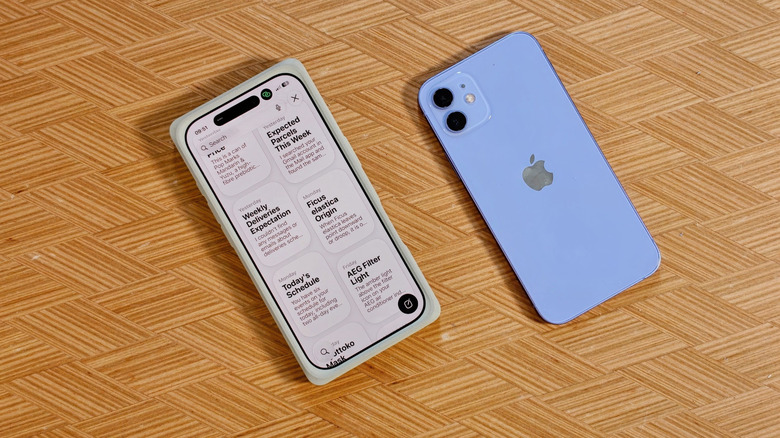
There's also a dedicated Siri app, which keeps a persistent history of your requests and interactions. Cleverly, it won't store timers and other simple tasks. I think Siri's new app is where there's plenty of room to improve: If you upload images to Siri to interact with or access, it won't show a thumbnail or even a confirmation. This meant I'd attempt to upload the same image multiple times without a result. That's an easy fix, though.
Another Siri AI feature is "Expressive Voice," which lets you customize the expressiveness and pace of Siri's voice. It's only available in US English, though, with one male and one female voice option. I appreciate the fine-tuning as I find most voice assistants either too chipper or too slow.
Siri AI in action
Siri AI works best when it's drawing on context, figuring out what you want and pulling it from inside your iPhone. For example, pulling up the Siri dropdown and typing in "Black Clover" will show the episode I was most recently watching on Crunchyroll. This upgraded phone search does what the likes of Claude and ChatGPT can't because Siri AI is built into your iPhone.
In fact, it can take several days for Siri AI to index and optimize its search across everything on your phone once you've upgraded to iOS 27. Apple suggests keeping your phone plugged in to charge longer to speed up this often lengthy process. (You can also block apps you don't want Siri to delve into for results.)
While it sometimes shines, it's still in beta. I found I had to ensure I was using the built-in Mail app, not Gmail (my main email app), for Siri to unearth delivery messages and updates. Hopefully, third-party app compatibility will improve in time.
This might be a specific 'me' thing, but using the new Siri finally offers a direct and swift way to interact with timers, stopwatches and alarms without having to dabble in widgets or bounce around the clock app.
iOS 27 also introduces a new XL widget size option for those looking for a full-screen info-dump, or at least a calendar widget you can actually read and interact with. For now, it's predominantly native apps, but it hasn't taken long for major app developers to release upgraded widgets ahead of the official launch for previous iOS updates.
Siri AI is also good at digging up specific images, like my passport headshots or photos of my nieces. There's still plenty of room for growth though. When I asked about specific phone settings, Siri AI would immediately tap out. It wouldn't even explain why it couldn't navigate me to the settings I was asking for, or just tell me where the specific menu might be.
While not a Siri AI feature, the accuracy of system-wide dictation has significantly improved at handling punctuation and formatting automatically as you speak. I found the transcription of lengthy Voice Memos between multiple people to be both far more accurate and significantly faster.
Camera and multimodal features
Siri's multimodal capabilities are also integrated directly into the Camera app in iOS 27. There's a new Siri tab that sits between the photo and panorama camera functions. Tap the shutter button, and Siri analyzes the photo's contents. While it successfully identified a Muji-branded hexagonal pen (down to the nib size!), it failed to recognize a unique Tiki cup from Ikea. You can also expand your questions, so I was able to get help identifying a plant type or adding dates from a poster to my personal calendar.
Writing tools and shortcuts
Apple is evolving its AI-powered writing tools, too. In the Mail and Messages apps, Siri can now mimic your typical communication style. If you're a "bullet points to the manager" type of sender, it will draft emails that match that tone and format, although I wish this knowledge base for personalized communication styles could be used across non-Apple apps.
The new "Write with Siri" button, which expands from the Dynamic Island, is a significant improvement over previous iterations. It feels more tightly integrated, so you aren't hopping between different interfaces just to polish a draft.
For power users, creating shortcuts using natural language is a game-changer. You simply type the task you want into a text box (or dictate it), and Apple Intelligence generates the shortcut for you. It's a clean way to handle automation, without needing to be a coding wizard. It's more direct and far less intimidating than the original Shortcuts app. I've got three shortcuts running, all of which took minutes to set up. Here's a suggestion to try: turning on WiFi the moment your iPhone detects you're at home.
Beyond natural language input, iOS 27 makes it easy to refine and tweak shortcuts or automations without digging into the technical nuts and bolts. If you've never touched the Shortcuts app before, it might be time to try it out.
Photos and generative AI
The Photos app is getting more generative AI features, but Apple is directing these toward practical editing rather than hallucinatory, IP-baiting AI slop made from a few prompts. A new "Extend" tool lets you expand images to give your subject more room. At the same time, "Spatial Reframing" allows you to manually adjust a shot's angle - a unique and welcome addition for fine-tuning composition.
While these features work with any photo you have saved to your phone, you may find yourself getting turned into a chunky PS1-era character depending on the original photo's composition and resolution. Sometimes the results are elegant and subtle tweaks, although, you'll see the fingerprints of an AI edit, struggling to replicate text, for example, after a quick reframe.
Apple says that image generation will eventually have daily usage limits, likely tiered by iCloud+ subscriptions. We expect the company to share specifics closer to its public launch.
Other elements of iOS 27
Several features won't arrive on iOS 27 until the fall. Apple Maps will eventually get an improved, richer Flyover experience that will blend aerial imagery with AI. The Maps app now pulls in regional guides and editorial features, accessible directly from the app. These "What's Trending" articles are admittedly a little light at launch. At the time of writing, it only covers two cities near me: London, UK and Paris, France. US residents have significantly more support, with over 20 cities already covered via third-party guides.
In London, there are only a handful of these right now. While The Infatuation's restaurant recommendations are genuinely useful (RIP Eater London), I'm less likely to check out United Airlines' guide to London when I'm already a dead-behind-the-eyes Londoner. There's room for improvement, but I like that it uses curated human expertise (mostly) for these guides instead of automated lists, so I have more faith in the recommendations. At the time of writing, Google Maps' equivalent is overrun by Dua Lipa's Service95. I'll pass, Dua.
There are other smaller upgrades worth noting:
- RCS 2.7 support comes to Messages, bringing inline replies, editing and unsending capabilities, closing the gap further between RCS and iMessage.
- Safari can automatically organize your browsing tabs into groups, and a new Notify Me feature can track webpages for stock updates and price changes.
- With Find My, Apple is adding more granular location sharing. In addition to briefly sharing for custom durations (like sharing a location via WhatsApp and other apps), you can also quietly pause sharing with individuals you've shared your location with, without notifying them.
- If you've got AirPods, Custom EQ is coming to them as part of iOS 27, while AirPods Pro 3 will be able to sync heart-rate data through Gymkit, meaning it'll integrate with your connected treadmills and other fitness equipment without the need for an Apple Watch.
- iCloud Shared Albums will offer cross-platform photo sharing, while still maintaining full resolution of your images.
- The Wallet app will also gain improved camera integration for scanning and adding cards.
- Apple says its Health app will also get support for perimenopause and menopause in cycle tracking.
The verdict (so far)
iOS 27 may be all about Siri AI, but the performance improvements make my iPhone feel faster, even on a developer beta build. Compared to Android's integration of Gemini, Apple's latest steps into AI are attempts to solve genuine friction points in our daily workflow. It isn't trying to write movie scripts or code complex apps from scratch - it's trying to be a better assistant for the tasks you actually do on your phone.
In that regard, it's succeeding, although the lack of truly remarkable features is a little disappointing. It does make sense, though, when the company wants everyone focused on its Siri makeover and, I'd assume, its reliability.
The public beta is worth a try if you're a regular voice assistant user, or have never been able to get your iOS shortcuts to work, but Apple's Siri AI still has a lot to catch up to. Is this foundational reset enough to compete with the heavy hitters in AI? With assistance from Google's Gemini (and existing ChatGPT integration), it's a strategic approach to draw on the strengths of the leading AI players, and, for now, it kind of works. It's certainly better than waiting another year for a more capable Siri.
Comments
No comments yet. Start the discussion.